
Individual + consensus forecasts
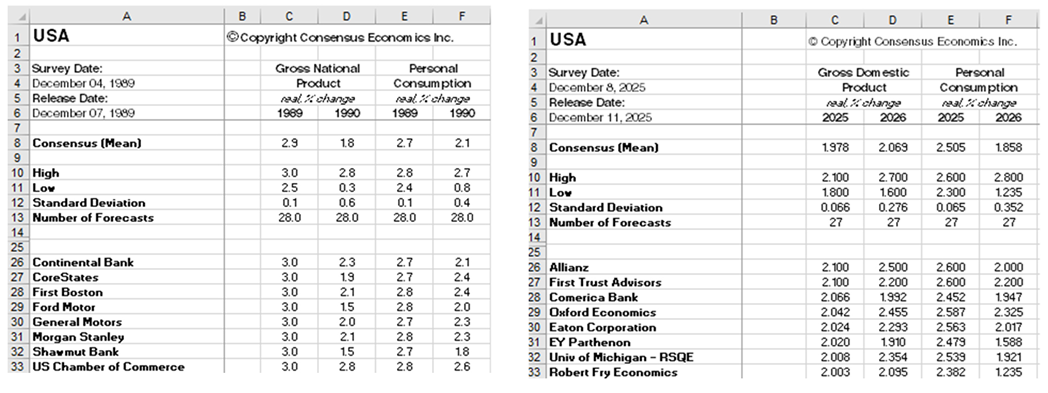
Individual panel estimates alongside mean, high, low and standard deviation for the major countries and indicators covered by each regional survey.
Structured historical and current Consensus Forecasts data for research, modelling and automation, with monthly updates and a deliberately consistent workbook structure.
Each survey database preserves the forecasts that were available at the time, allowing researchers to backtest models, study revisions and measure forecast performance on a proper point-in-time basis.
Historical spreadsheet services are available across our core macroeconomic, currency and commodity forecast publications. Each service combines historical survey databases with ongoing spreadsheet updates.
Similarly defined variables are kept in consistent spreadsheet columns and consensus data appears in the same rows from survey to survey. The survey date is included, helping clients link the data into models, research systems and automated extraction processes.

Regional Excel services include a TrendCharts workbook tab for quickly displaying forecast revisions through time. Users can select countries, variables, survey years and consensus statistics to build an immediate visual history of changing expectations.
The regional monthly files provide the underlying distribution of professional forecasts as well as additional market series and tools.
Individual panel estimates alongside mean, high, low and standard deviation for the major countries and indicators covered by each regional survey.
Consensus means for selected variables in additional economies covered by the regional forecast publications.
Selected exchange rate consensus forecasts plus Brent oil price expectations and the spot price on the survey date.
Past survey releases let researchers examine what professional forecasters expected at each point in time rather than only the latest forecast.
Work directly with Consensus Economics Excel files and point-in-time historical databases, or access selected datasets through established institutional research platforms.
Receive preserved historical survey databases alongside ongoing spreadsheet updates delivered on publication release days.
Selected Consensus Economics databases are also available as premium services through leading institutional data platforms.
Yes. Our Excel datasets are structured for machines as well as people. We use strict naming conventions, consistent worksheet and field structures, stable series references and repeatable layouts so files can be incorporated into established analytical processes rather than rebuilt manually after every release. Explore API access.
That makes them well suited to macros, scripts and repeatable data pipelines in Python, R, VBA, Power Query and AI-enabled analytical workflows.
Yes. Historical survey databases preserve the forecasts that were actually available at each point in time, allowing users to backtest models and strategies without reconstructing history from today's revised data. Historical data for institutions.
The regional monthly files include individual panel forecasts alongside the consensus mean, high, low and standard deviation for major countries and indicators, giving users access to the distribution behind the headline number. How the consensus works.
Historical coverage varies by dataset, with core Consensus Forecasts survey history extending back to 1989. The databank now contains more than 21 million individual forecasts. Read our history.
The spreadsheets focus on structured forecast data. Commentary from the accompanying forecast publications and special survey text are not included in the Excel files. Explore the full forecast publications.
Review the forecast structure first, then order the service you need for ongoing access.